

GameplayTagComponent
GameplayTagComponent attaches runtime Gameplay Tags to a GameObject. It is the bridge used by
tag-aware Game Creator Actions, Conditions, Events, object queries, and custom scripts.
Common targets include characters, enemies, interactables, pickups, doors, traps, and quest objects.
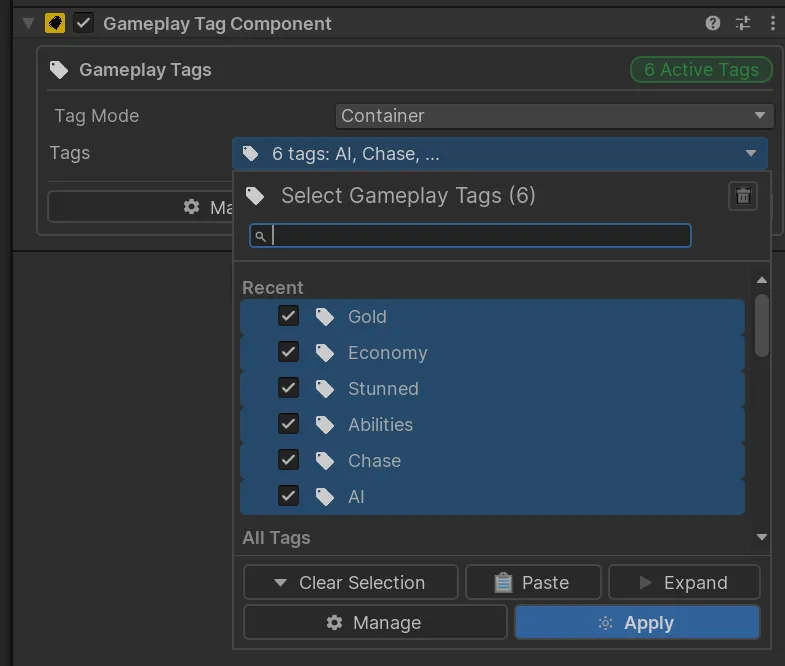
| Mode | Behavior | Typical use |
|---|---|---|
| Container | Holds several simultaneous tags. | An enemy that is burning and fire-resistant. |
| Single Tag | Holds one primary tag at a time. | One active state within an exclusive category. |
Container mode is the flexible default. In Single Tag mode, setting a new primary tag replaces the existing tag.
Runtime operations
Section titled “Runtime operations”The component supports adding, removing, clearing, replacing, and querying tags. Duplicate or empty tags are ignored, and removing an absent tag has no effect.
Use these public APIs for mutations:
component.AddTag(tag);component.RemoveTag(tag);component.SetTags(container);component.SetPrimaryTag(tag);component.ClearTags();Events
Section titled “Events”Subscribe to:
component.EventTagsChanged += OnTagsChanged;component.EventTagAdded += OnTagAdded;component.EventTagRemoved += OnTagRemoved;Always unsubscribe when the listener is disabled or destroyed.
Save memory
Section titled “Save memory”The plugin includes the Game Creator memory type:
Game Object/Gameplay TagsUse it when runtime changes on a GameplayTagComponent must be restored by Game Creator’s save
system.