

Visual Scripting
Animation Montages integrates with Game Creator 2’s standard visual-scripting sheets.
Actions
Section titled “Actions”| Action name | Purpose | Inputs |
|---|---|---|
Play Montage |
Play a Montage asset on a Character. | Montage, blend overrides, layer settings |
Stop Montage |
Fade out and stop active playback. | Character, fade-out duration |
Cancel Montage |
Interrupt active playback without the normal blend-out. | Character |
Set Montage Speed |
Change the runtime playback multiplier. | Character, float speed |
Set Branch Result |
Force a result for a Branch. | Character, Branch ID, boolean result |
Toggle Transform Track |
Enable or disable a Transform track. | Character, track ID, enabled state |
Play with parameter overrides
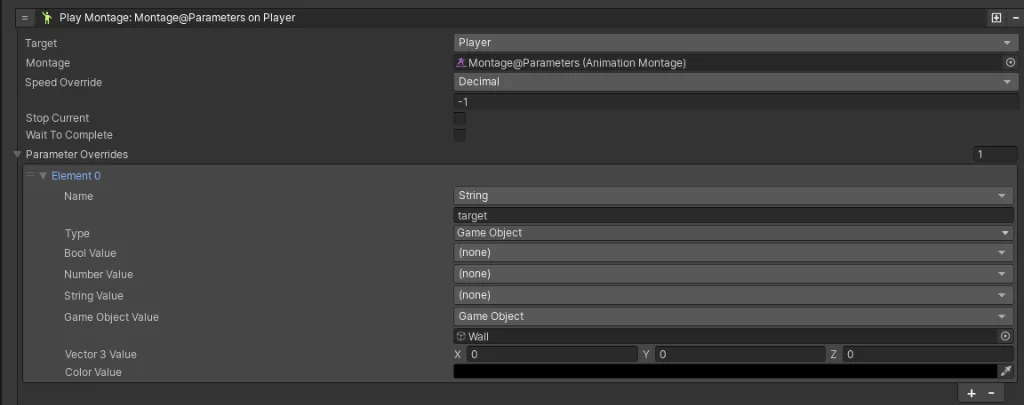
Section titled “Play with parameter overrides”The Play Montage Action can override values defined on the asset. For example, the target
GameObject parameter can be assigned to a scene object when the Action runs.
Enter a State
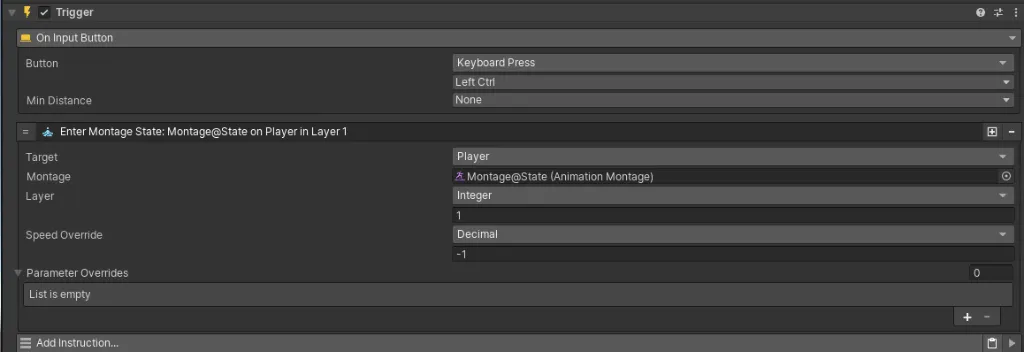
Section titled “Enter a State”The source also shows an Enter Montage State Action with Character, Montage, Layer, speed, and parameter override fields.
Conditions
Section titled “Conditions”| Condition name | Check | Example use |
|---|---|---|
Is Montage Playing |
Whether a Character is playing any Montage. | Gate input during an interaction |
Is Specific Montage |
Whether a particular asset is active. | Detect an active reload |
Is Window Active |
Whether a named range is open. | Detect a parry or invincibility period |
Compare Percentage |
Compare the normalized playhead to a value. | Enable a late cancel |
Has Notifier Fired |
Whether a point event was crossed. | Avoid repeating a cue |
Triggers
Section titled “Triggers”Available visual-scripting event hooks include:
- On Montage Started / Completed
- On Montage Cancelled
- On Montage Notification
- On Montage Window Opened / Closed
The package includes additional Actions, Conditions, and Triggers beyond the primary workflows listed on this page. Use the Game Creator picker to browse the complete installed set.
Related guides
Section titled “Related guides”- Timeline Authoring explains what each event represents.
- Variables and Integration covers parameters and runtime values.
- C# API documents the programmatic counterpart.